Apple’s Keyboard: Smart Design or Stubbornness?

ABET NEWS | TECH – OPINION | NOVEMBER 3, 2026
Apple has built its reputation on thoughtful design, attention to detail, and the belief that technology should feel effortless. But every so often, a seemingly insignificant design decision raises a bigger question: Is Apple making products better for its users, or simply insisting that its own way is the right way?
The iPhone keyboard offers a particularly frustrating example. Millions of people use it every day, yet anyone who frequently enters numbers must repeatedly switch between the letter keyboard and the number-and-symbol layout.
Apple’s defense might be that a dedicated number row takes up valuable screen space. But there’s a problem with that argument.
Apple already has a native iOS keyboard with a dedicated number row. It simply isn’t offered as a straightforward option on the standard English keyboard.
And that changes the conversation.
The number row is already hiding inside iOS
Here’s the discovery that makes this story more interesting than another complaint about Apple’s keyboard.
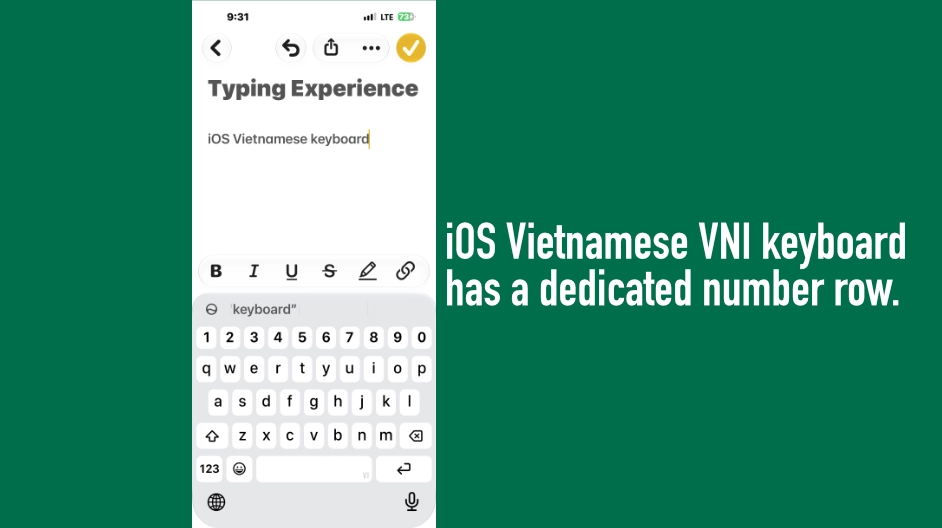
The Vietnamese VNI keyboard, available as a built-in iOS keyboard layout, includes a dedicated number row above the letters. Users can enable it through Settings, add Vietnamese as a keyboard, and select the VNI layout.
No third-party keyboard is required.
The catch? VNI is designed for Vietnamese text entry, using number keys to produce Vietnamese characters and diacritics. Although it can be used to type English text, it doesn’t provide the same English-language predictive experience, and its behavior can become inconvenient for anyone who uses English as their primary language.
VNI layout is one way to get a number row without installing a third-party keyboard.
Apple’s own iPhone keyboard documentation confirms that users can add language keyboards and select alternative layouts where available.
So the question isn’t whether iOS can display a number row. It demonstrably can.
The question is why Apple doesn’t give English-speaking users a comparable option on the standard keyboard.
Why the screen-space argument deserves another look
Apple’s traditional keyboard layout requires users to tap the number key before accessing digits. To return to letters, they must switch back again.
For occasional number entry, this is hardly a crisis. But typing passwords, email addresses, phone numbers, verification codes, product serial numbers, or numerical data can turn those extra taps into a persistent annoyance.
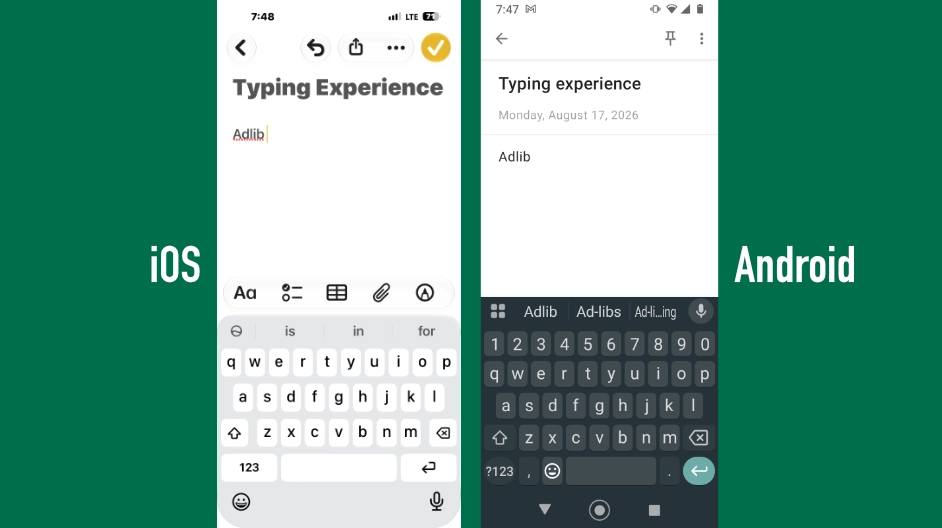
Android keyboards such as Google’s Gboard can display a dedicated number row while keeping the familiar QWERTY letter layout.
In the side-by-side comparison that inspired this article, the Android keyboard’s number row doesn’t appear to demand an unreasonable amount of additional screen space. Instead, it offers immediate access to digits without requiring the user to leave the letter layout.
Of course, the exact space occupied depends on the device, screen size, keyboard configuration, and other interface elements. Adding another row can have trade-offs, including smaller keys or less room for app content.
But those trade-offs should be evaluated rather than treated as an automatic reason to deny users a choice.
Apple could offer an optional number row, leaving the existing layout untouched for people who prefer it. Those who value the compact keyboard could keep it. Those who value quicker number entry could enable the alternative.
That would be a more flexible solution than expecting everyone to accept the same design.
If the layout exists, why not offer it in English?
We should be careful not to confuse the existence of the VNI layout with proof that Apple could implement an identical English keyboard through a trivial code change. The Vietnamese keyboard has its own language-specific behavior, and adapting a layout for English would require appropriate testing and implementation.
We also don’t know Apple’s internal reasoning. The company hasn’t publicly established that screen space, development cost, consistency, or any other single factor explains the absence of this option.
Nevertheless, the existence of VNI establishes something important: a number row is not inherently incompatible with Apple’s native keyboard system.
Apple has already made the design choice in one context. It has not offered the equivalent flexibility in another.
Why not let users decide?
Apple routinely gives users options for other aspects of their devices. The company allows alternative keyboard layouts, supports third-party keyboards, and provides settings to customize typing behavior. Its official keyboard guide explains some of these choices.
A dedicated number row for English would be another opportunity to give people control over how they interact with their devices.
And this isn’t a request to replace Apple’s keyboard. It’s a request to improve it.
A second example: when autocorrect misses the point
The number-row debate isn’t the only reason to question Apple’s keyboard decisions.
Consider a small but revealing experience from a conversation with Siri: typing the word adlib.
The term is widely used in music, including hip-hop, songwriting, recording sessions, and production notes. Yet on the device in question, typing “adlib” triggered an autocorrection suggestion of “Adkin” rather than the familiar spelling “ad-lib.”
There is a legitimate linguistic distinction here. Traditional dictionaries commonly list ad-lib with a hyphen, while adlib is widely used informally and in music-related contexts. A dictionary or spellchecker may not recognize every variant of a word.
But that is precisely why context matters.
A keyboard that encounters unfamiliar words should ideally help users express what they mean, rather than repeatedly steering them toward a correction that makes little sense in context.
The experience also raises a reasonable question about how effectively personal typing habits influence autocorrection. Apple’s keyboard offers personalization and text-replacement features, but those features don’t eliminate every frustration with its built-in dictionary and predictive behavior.
For a musician, writer, or anyone working with specialized vocabulary, these details matter. A keyboard isn’t just a collection of keys. It’s an everyday tool for turning ideas into words.
Apple, the company that understands creative professionals
Apple has long cultivated a relationship with creative professionals through products and software such as Logic Pro, Final Cut Pro, GarageBand, and its Mac lineup.
Musicians, producers, writers, and other creators often move between devices and applications throughout the day. Their work can involve technical terminology, specialized vocabulary, numbers, symbols, and repeated text entry.
That makes the keyboard an important part of the overall experience, even if it isn’t the feature that attracts people to an iPhone in the first place.
We shouldn’t assume that every musician wants a number row or that creative professionals all prefer the same keyboard. But Apple has every reason to recognize that different users have different workflows.
A better keyboard doesn’t have to mean a more complicated default. It can mean giving people meaningful choices.
And for users who spend hours typing on an iPhone, those choices can make a real difference.
Does Apple listen to its users?
This is the larger question behind the number-row debate.
Apple accepts feedback through its official iPhone product-feedback page. The company says it reads feedback carefully, although it cannot respond individually to every submission.
But accepting feedback and implementing a requested feature are two different things.
We cannot know how many users have requested a dedicated number row, how Apple has evaluated those requests, or what internal testing has shown. Nor should we assume that a missing feature proves the company hasn’t listened.
Still, a feature request that remains unfulfilled for years naturally invites questions about how Apple prioritizes usability improvements.
Perhaps Apple’s research suggests that the current keyboard is the best default for most users. Perhaps there are technical considerations that aren’t apparent from a screenshot. Or perhaps the company has simply decided that other improvements deserve priority.
Those are possibilities, not established explanations.
What Apple could do, however, is make the choice easier: offer an optional English keyboard layout with a dedicated number row and let users decide whether it suits them.
The existing layout could remain exactly as it is. Nothing would need to change for people who prefer it.
That is the advantage of making a feature optional.
Smart design should give users choices
Apple’s design philosophy has produced products that have changed entire industries. Its emphasis on simplicity, consistency, and carefully considered interfaces deserves recognition.
But good design isn’t about preserving every decision forever.
Technology evolves, user habits change, and a feature that once seemed unnecessary can become valuable as the ways people use their devices evolve.
The Vietnamese VNI keyboard doesn’t prove that implementing a dedicated English number row would be effortless. It does, however, demonstrate that Apple’s own keyboard system already accommodates a number-row layout.
That makes the absence of a comparable English option a legitimate question for Apple to answer.
A number row won’t transform the iPhone. Neither will recognizing every informal spelling or improving a single autocorrection.
But great products are often distinguished by the accumulation of small improvements that make everyday tasks easier.
Apple doesn’t need to abandon its design philosophy. It needs to remember that simplicity and flexibility aren’t mutually exclusive.
The real question isn’t whether Apple’s keyboard is smart or stupid. It’s whether Apple is willing to give users the freedom to decide what works best for them.
Apple has already built a keyboard with a number row. Now it’s time to give English-speaking users a proper choice.
What do you think?
Would you enable an optional number row on your iPhone’s English keyboard? Or do you prefer Apple’s current layout?
And if you’ve been asking Apple for a keyboard improvement that still hasn’t arrived, we’d like to hear about it.
Join the conversation with Abet News. Sometimes the smallest design decisions reveal the biggest differences between what a company believes users need and what users actually want.
Andy Young
© 2026 Abet News. All rights reserved.
Related Posts




Apple TV+

JMI Construction