iOS 26: Bold New Design or Buggy Battery Drain?

Apple has officially rolled out iOS 26, calling it one of the boldest redesigns in years. But reactions from users and reviewers are sharply divided. While some hail the “Liquid Glass” aesthetic and new features as a leap forward, others say the update feels rushed, buggy, and even harmful to battery life.
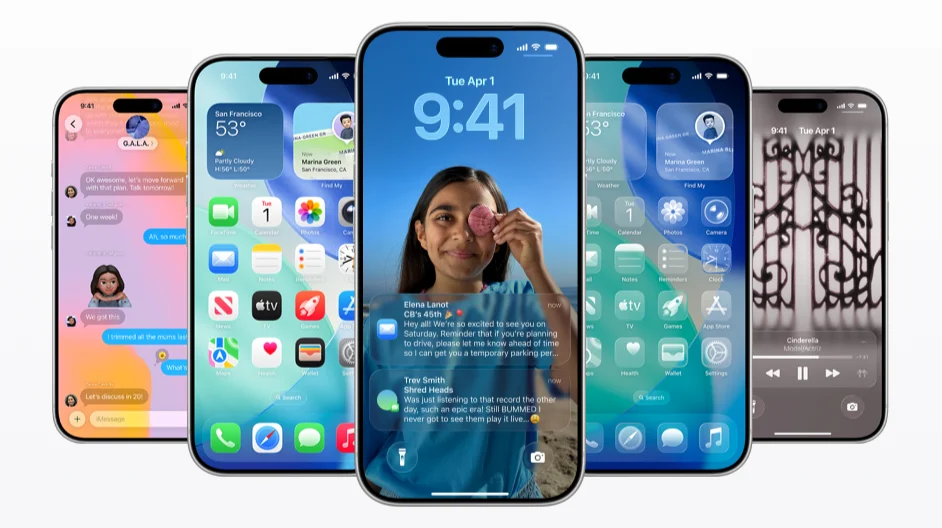
The Promise of iOS 26
At the center of Apple’s pitch is Liquid Glass, a translucent, glassy interface with fluid animations that extends across the iPhone, iPad, Mac, and Vision Pro. Apple frames it as a way to make the experience more immersive and visually unified across its ecosystem.
The update also introduces a slate of practical features:
• Call Screening to block spam and robocalls while letting real callers leave messages.
• Live Translation for real-time message and voice translation within apps.
• Spatial Photos that add 3D-like parallax effects for use on iPhone or with Vision Pro.
• Enhanced customization for lock and home screens, including spatial backgrounds and flexible clock sizes.
The Criticism
Not everyone is convinced. Some users and reviewers describe the Liquid Glass design as “cheap” or reminiscent of “old Winamp skins.” Others say it feels half-baked, with inconsistent styling across apps and animations that sometimes distort text or icons.
Reports of bugs and glitches are also circulating: app icons redrawing themselves, UI lag, and mismatched transparency effects that undermine Apple’s promise of visual polish.
Battery and Heat Concerns
Perhaps the loudest complaints come from iPhone 11, 12, 13, and SE users, many of whom report their phones are running hotter and that battery life is draining faster after installing iOS 26. This is not unusual for early versions of major iOS releases, but it has raised concerns that Apple may have rushed the update before ironing out performance issues.
Mixed Reactions
For some, the redesign is a welcome change—the boldest since iOS 7—and makes everyday interactions feel more lively and fluid. Others argue that usability has taken a back seat to aesthetics, leaving the system feeling like “a work in progress.”
What’s Next
Apple is likely to address many of these issues in upcoming bug-fix updates (such as iOS 26.0.1 or 26.1), which typically arrive within weeks of a major release. In the meantime, users who value stability may want to wait before upgrading, while those eager to experience the new design can tweak accessibility settings to reduce transparency and increase contrast.

Bottom Line: iOS 26 represents Apple’s most daring design shift in years, but it comes with trade-offs. Whether it feels like a groundbreaking step forward or an unfinished experiment depends on what you value more—style or stability.
Andy Young
Abet News | September 17, 2025 – September 20, 2025
Related Posts



Apple TV+
JMI Construction